Scrabber: building a Scrabble score keeper with specs
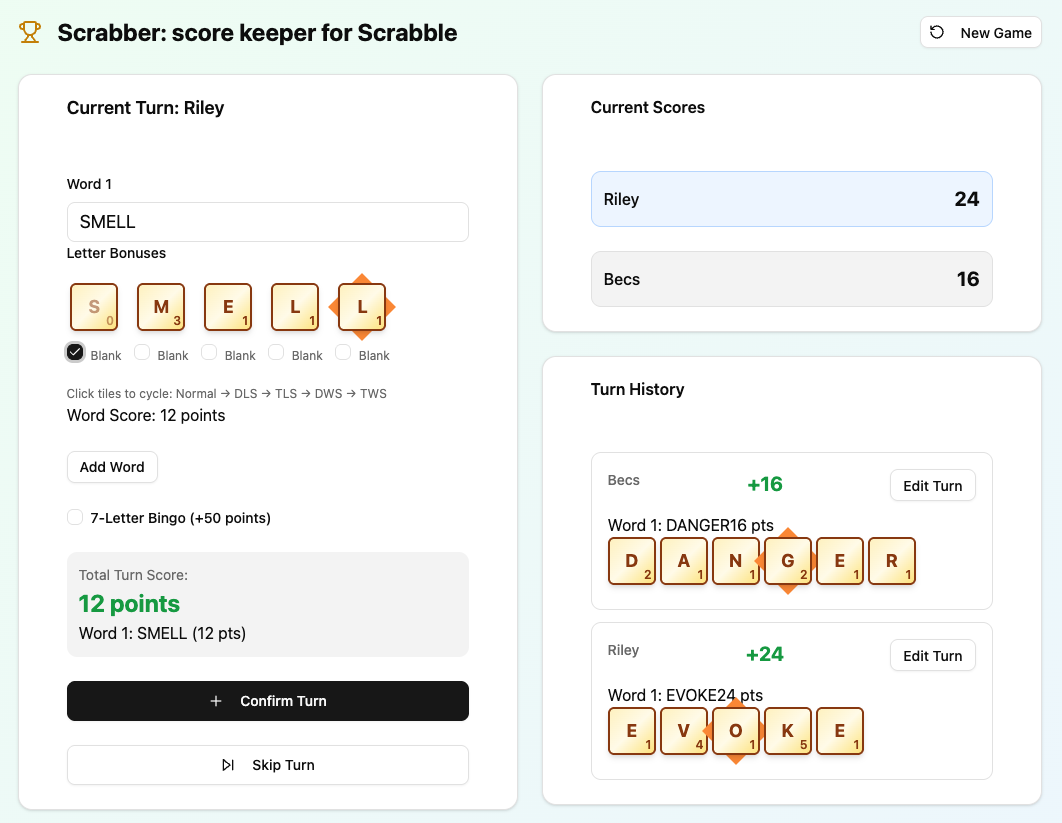
I’m a little addicted to trying out the various AI tools out there to see what each does better or worse, and occasionally people will ask my opinion on such things. When called on to provide on opinion on Vercel’s v0, I’d not actually used it for much, and certainly nothing in the areas v0 excels: Next.js applications and prototyping. With 20 minutes until the meeting, I gave it a go.
In search of a quick and easy product to develop, I cast my mind back to something I’d previously built quite a few years ago: A Scrabble Scorekeeper app. I’d built this in AngularJS as a way to practice coding with the framework, back when people used AngularJS (somewhere between 2010 and 2015). The app was basic enough: input a word and select double/triple score on the appropriate tile to calculate the score. How would v0 cope with this? And where to start?
If you’ve read my previous post, you’ll know that Specification Driven Development (SDD) is what all the cool kids are doing now, so based on this, I asked Gemini to generate one for me (specifically I asked for a PRD - a Product Requirements Document - which outlines the shape of the product I want to build).
As I mentioned in my last post, I used the following prompt to generate the PRD for this app:
Create me a PRD for a web app that keeps scrabble scores.

The user would enter their word, and select any spaces where double/triple letter scores or double/triple word scores are, and the app would keep track of the words played and what each one scored for the 1 - 4 players involved.
As you can see, it’s a fairly minimal prompt. I’ve included the output at the bottom of this post so you can get an idea of what to expect.
Using SDD you’d then normally break this down further and split it up, but as I’m testing v0’s one-shot capabilities here as a potential prototyping tool, so the PRD goes straight into v0 and it starts chugging away.
From prototype to production
v0 spat out a Next.js app with Tailwind CSS - exactly what you’d expect from a tool optimised for that stack. The initial output was solid enough: a functional scoreboard that handled basic word entry and player tracking. But when I tried to refine it, things got sticky.
I wanted to add visual indicators for double and triple letter scores - clickable tiles that would cycle through normal, double, and triple states. Simple enough in theory, but v0’s model kept fighting me. It refused to extract the letter component into something reusable, preferring instead to duplicate code. After a few rounds of prompt engineering that felt more like negotiation than development, I called it: v0 is great for one-shot prototypes, less so for iterative refinement.
So I downloaded the repo and opened Cursor. The refactor was straightforward: swap Tailwind for SASS using SUIT CSS naming conventions (a personal preference - it’s a lot like BEM), and rebuilt the letter component properly. Within an hour, the app was cleaner, more maintainable.
I also set it up to auto-deploy on Vercel whenever I pushed changes to the repo’s main branch, so if I needed to play Scrabble, I actually had it live somewhere.
The Slovenian Scrabble test
That opportunity to finally test the app came on holiday. Becs and I picked up a set of Scrabble playing cards, not realising they were designed for Slovenian speakers until we started playing. Slovenian Scrabble uses different letter point values because the language’s letter frequency differs from English: more vowels, different consonant clusters etc. The cards suggested point values that didn’t match our English scoring, so I pulled out the app for the first time in anger (well, it wasn’t completely in anger until Becs trounced me).
It worked pretty well out of the box: we could enter words, apply bonuses, and track scores without relying on the card’s suggested values. I love it when an app comes together.
Discovering the gaps
In the course of the game, I quickly realised I’d missed something crucial: multiple word scoring. In Scrabble, when you lay a word that creates other words (like DIGS extending TRACK to make TRACKS), you score all of them in the same turn. I’d built the app to handle one word at a time, which meant every multi-word play required manual calculation and entry.
This was the moment SDD proved its worth. Instead of vibe coding a quick fix, I wrote a proper specification using the contextual prompt from my talk:
“Create a spec in
/docscalledmultiple-words.mdfor the feature: when a player adds a word that also creates other words (e.g. DIGS making TRACKS), score all words in that turn. Ensure the solution scales to many incidental words. If the work exceeds a day, touches more than five files, or scores above Fibonacci 3, split it into subtasks.”
The assistant generated user stories, Gherkin scenarios, and a sensible implementation plan. I reviewed it, tweaked the approach, and then implemented it slice by slice with tests at each step. When I was next playing Scrabble with my wife and her family, I released and iterated on the feature and it was handling complex multi-word turns without much bother.
Around the same time, I added a few more quality-of-life features: editing turns (because fat-fingered scores happen), localStorage persistence (so a tab refresh doesn’t wipe your game), and a checkbox for 7-letter “bingos” (no more accidental 50-point bonuses). Each change followed the same SDD workflow: spec first, code second, tests throughout.
The app now lives at v0-scrabble-score-keeper.vercel.app and is ready for your next Scrabble Game. You can also download/fork/eat the source code if that’s to your taste.
What’s next on the board?
The backlog sits right beside the spec so that Future Riley has a roadmap when the next rainy Sunday hits:
- Save previous games so we can keep a running league table.
- Share games by URL (perfect for remote play or post-match bragging).
- Reconstruct the board automatically from the move log.
- Apply bonuses automatically once the board has coordinates wired up.
- Track tile counts.
- Add a Scrabble dictionary, to cal you out for making up words again.
SSD for the win
Scrabber isn’t just a novelty app (although yes, also it’s definitely that); it’s the proof that SDD works outside a slide deck. The multi-word feature went from idea to production with guardrails, tests, and documentation in place — no vibe coding required. The rules I set for the assistant inside the project (TDD first, explicit file lists, named subtasks) meant every AI-driven change slotted neatly into the repo.
Fancy a game?
If you try Scrabber, let me know how it handles your most chaotic games, which features you crave next, and whether you spot any dodgy scoring (I’ll fix it faster than you can swap tiles).
The Product Requirements Doc for Scrabber
Here’s the spec I generated in Gemini for Scrabber - it even suggested some out of scope features I later realised I needed!
# Product Requirements Document: Scrabble Score Keeper

## 1. Introduction

This document outlines the requirements for a web-based application designed to help users efficiently track scores during a game of Scrabble. The application will simplify scorekeeping by allowing players to input words, mark bonus squares, and automatically calculate scores for each turn, maintaining a running total for up to four players.

## 2. Goals

- To provide an intuitive and easy-to-use interface for tracking Scrabble scores.

- To automate score calculations, reducing manual errors and speeding up gameplay.

- To offer a clear overview of current player scores and a history of played words.

- To support 1 to 4 players in a single game session.


## 3. User Roles

- **Player:** Anyone participating in a Scrabble game who needs to track scores.


## 4. User Stories / Features

### Game Setup

- As a player, I want to **start a new game** so I can begin tracking scores for my current Scrabble session.

- As a player, I want to **specify the number of players** (1-4) at the start of a new game so the app can track scores for everyone involved.

- As a player, I want to **enter player names** at the start of a new game so I can easily identify each player's score.


### Turn Management & Score Entry

- As a player, I want to **enter the word played** for the current turn.

- As a player, I want to be able to **select individual letters** of the entered word that land on **Double Letter Score (DLS)** or **Triple Letter Score (TLS)** squares so their values are correctly multiplied.

- As a player, I want to be able to **select if the word lands on a Double Word Score (DWS)** or **Triple Word Score (TWS)** square so the entire word's score is correctly multiplied.

- As a player, I want the app to **automatically calculate the score** for the entered word, taking into account letter values and bonus squares.

- As a player, I want to be able to **indicate if a blank tile was used** for a letter, and specify what letter it represents, so its score contribution is zero but the word is correct.

- As a player, I want to **confirm the turn** to add the calculated score to the current player's total.


### Score Display & History

- As a player, I want to **see the current score for each player** clearly displayed.

- As a player, I want to **see a running list of all words played** and their individual scores for the current game, ordered chronologically.


### Game End

- As a player, I want an option to **end the game** to finalize scores and potentially start a new one.


## 5. Functional Requirements

### 5.1 Game Initialization

- **Player Count:** Must allow selection of 1, 2, 3, or 4 players.

- **Player Names:** Input fields for each player's name.

- **Game Reset:** A "New Game" button or similar clear action to reset all scores and game history.


### 5.2 Word and Score Input

- **Word Input Field:** A text input for the word played.

- **Letter Value Mapping:** The system must contain a mapping of standard Scrabble letter values (A=1, B=3, C=3, D=2, E=1, F=4, G=2, H=4, I=1, J=8, K=5, L=1, M=3, N=1, O=1, P=3, Q=10, R=1, S=1, T=1, U=1, V=4, W=4, X=8, Y=4, Z=10).

- **Bonus Square Selection:**

    - For each letter in the entered word, the user should be able to toggle/select if it's on a DLS or TLS square. This could be implemented with a visual representation of the word where each letter can be clicked to cycle through states (normal, DLS, TLS).

    - Separate checkboxes or buttons for DWS and TWS for the entire word.

- **Blank Tile Handling:** If a blank tile is used, its score value is 0. The app should allow the user to indicate a specific letter within the word was a blank.


### 5.3 Score Calculation Logic

- **Letter Score Calculation:**

    - Iterate through each letter in the word.

    - Get its base value.

    - If DLS, multiply by 2.

    - If TLS, multiply by 3.

    - Sum up all letter scores to get the base word score.

- **Word Score Multiplier:**

    - If DWS, multiply the base word score by 2.

    - If TWS, multiply the base word score by 3.

    - (Note: If both DWS/TWS apply to the same word, they multiply sequentially, e.g., TWS then DWS, but typically only one applies per word. Clarification needed on specific Scrabble rules if multiple word multipliers could ever apply from different tiles on one turn). For simplicity, assume only one word multiplier applies.

- **7-Letter Bonus:** If the word uses all 7 tiles from a player's rack (a "bingo"), add 50 points to the final score. The app should have a way to easily toggle/add this bonus if the user achieved it.

- **Running Total:** Add the calculated turn score to the current player's total score.


### 5.4 Data Display

- **Current Scores:** Clear display of each player's name and their total score.

- **Turn History:** A scrollable list showing:

    - Player name for the turn.

    - Word played.

    - Score for that word.


## 6. Non-Functional Requirements

- **Usability:**

    - Intuitive and clean user interface.

    - Responsive design to work well on various screen sizes (desktop, tablet, mobile).

    - Clear feedback on score calculation and turn confirmation.

- **Performance:**

    - Score calculation should be instantaneous.

    - UI should be fluid and responsive to user input.

- **Compatibility:**

    - Accessible via modern web browsers (Chrome, Firefox, Safari, Edge).

- **Accuracy:**

    - Score calculations must adhere to standard Scrabble rules.

- **Data Persistence (within session):**

    - Scores and game history must persist for the duration of the browser session (e.g., if the user navigates away and returns to the tab). No long-term storage required for MVP.


## 7. Technical Considerations (High-Level)

- **Frontend:**

    - **HTML:** For structuring the content.

    - **CSS:** For styling (e.g., Tailwind CSS for rapid development and responsiveness).

    - **JavaScript:** For all interactive elements, logic, and state management. A framework like **React** is recommended for managing UI state efficiently and component-based development.

- **No Backend Required for MVP:** For session-based scorekeeping, all logic and data can reside client-side in the browser's memory.

- **State Management:** React's `useState` and `useReducer` hooks would be suitable for managing game state (players, scores, turn history).


## 8. Future Enhancements (Out of Scope for MVP)

- **Save/Load Games:** Allow users to save current games and load them later.

- **Player Statistics:** Track average word score, highest word score, etc.

- **Customizable Letter Values:** Option to use different Scrabble versions (e.g., UK vs. US values).

- **Undo Last Turn:** Ability to correct mistakes.

- **Player Avatars/Colors:** Visual customization for players.

- **Timer:** Add a turn timer.

- **Dictionary Lookup:** Integrate a dictionary API to check word validity (though this is typically a player's responsibility in Scrabble).

- **Multi-Device Sync:** If saved games are introduced, allow syncing across multiple devices for a single game (would require a backend).